

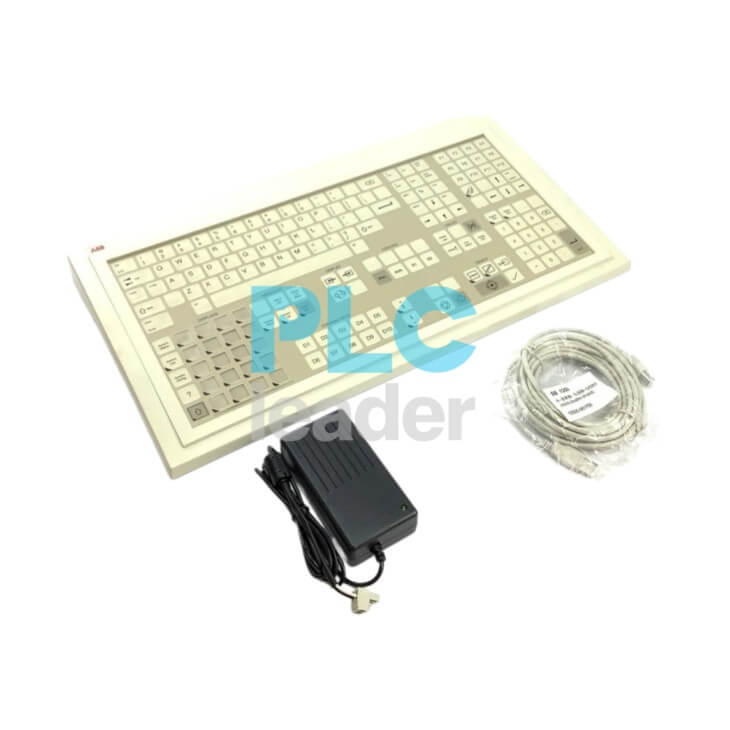
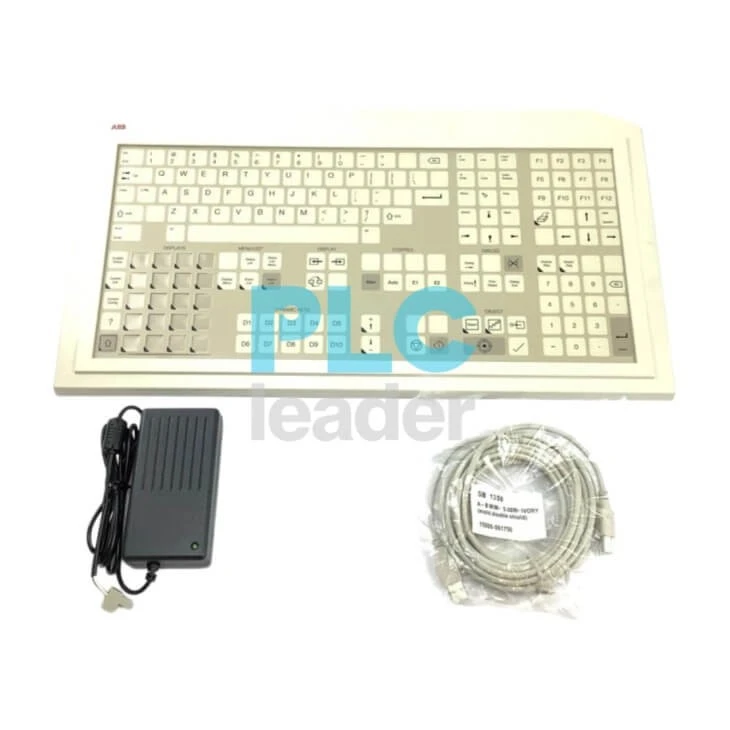
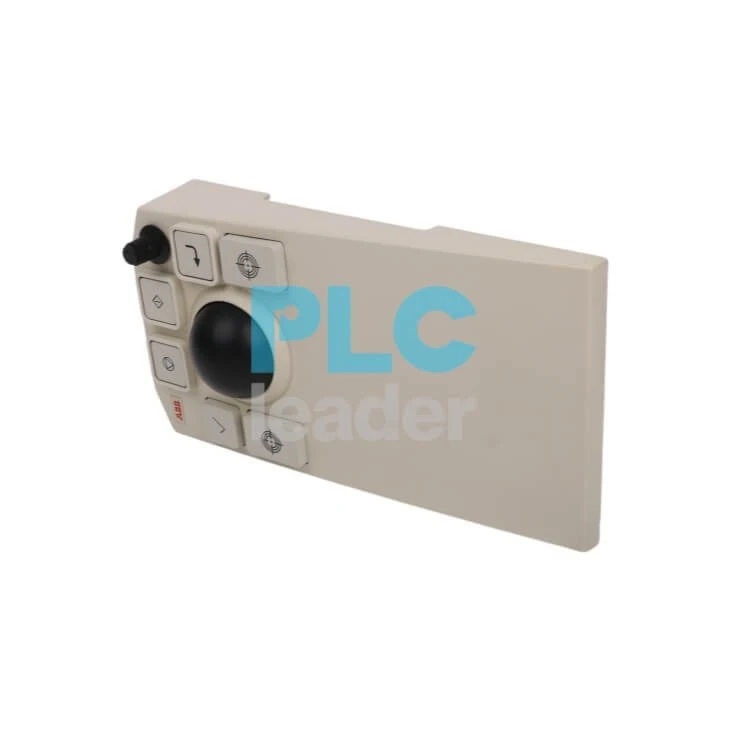
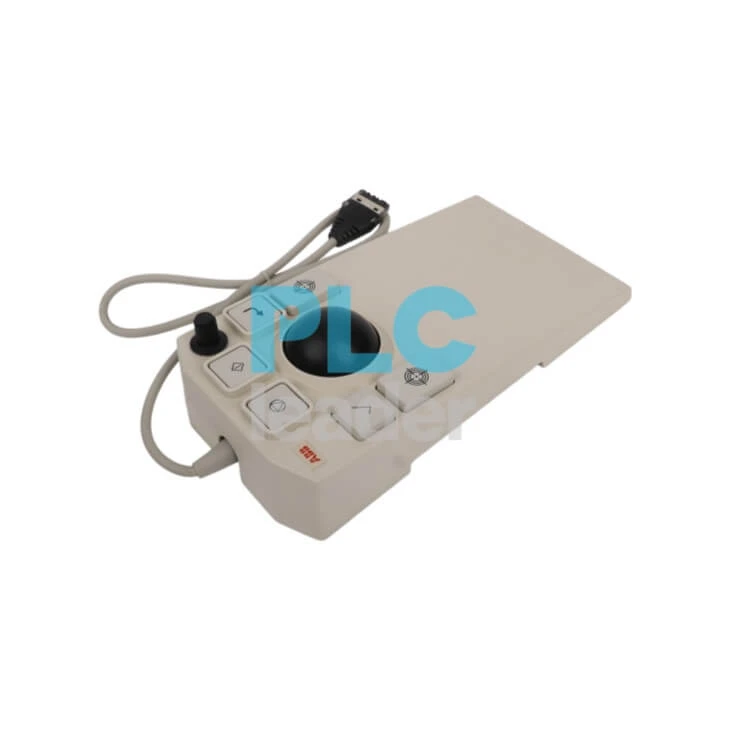
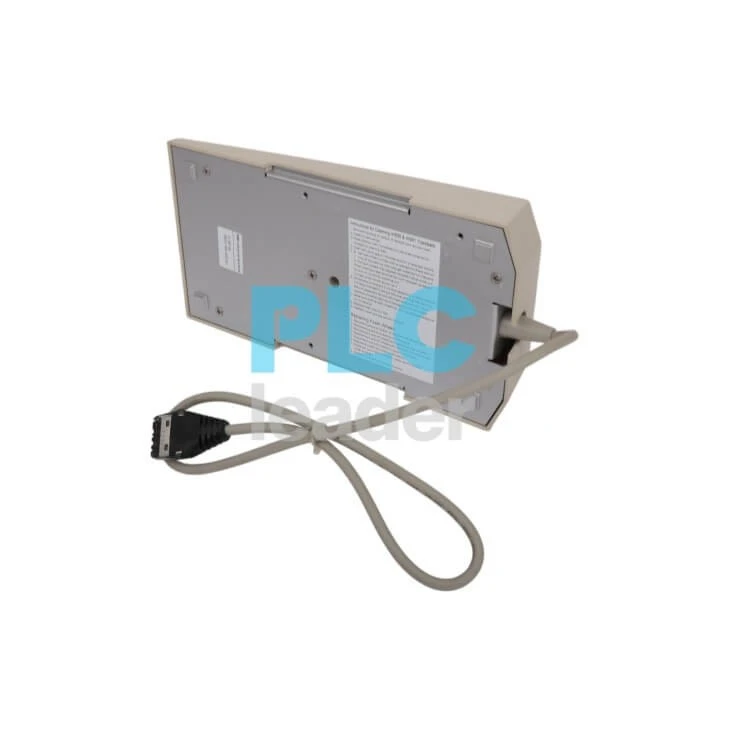
The ABB IH522ENK01 (3BSE019202R1) and IH581/B (3BSC640008R1) are high-reliability industrial keyboard and trackball assemblies designed specifically for central control room applications. Built to interface seamlessly with legacy Advant OCS (with MasterView / Advant Station) and modern 800xA process control environments, these heavy-duty human-machine interface (HMI) peripherals ensure rapid command execution and precise cursor tracking under continuous, 24/7 operating schedules.
At PLC Leader, we maintain a specialized inventory of factory-original ABB console input units, rugged trackballs, and enhanced functional operator keypads. Whether you are performing a control desk component replacement or keeping spare peripherals ready for critical system availability, our tested components provide direct compatibility without requiring driver modifications or process interruptions.
Quick Overview & System Compatibility: IH522ENK01 (3BSE019202R1) & IH581/B (3BSC640008R1)
Model Correlation & Component Specifications
In ABB automation systems, this configuration typically constitutes a complete console input suite consisting of the following two interconnected components:
Operator Keyboard Kit (Membrane):
- ABB Type Designation: IH522ENK01
- Product ID: 3BSE019202R1
- Description: A ruggedized, membrane-based operator keyboard kit engineered for harsh industrial environments. The kit includes the IH522EN keyboard unit, environmentally protected USB-compatible interface components, and required power/communication cable assemblies.
Enhanced Operator Trackball:
- ABB Type Designation: IH581/B
- Product ID: 3BSC640008R1
- Description: An industrial-grade, highly reliable trackball featuring a 6-button interface. It is positioned adjacent to the operator keyboard to serve as the core human-machine interface (HMI) console input peripheral.
System Compatibility Matrix
This console input suite is strictly compatible with, and validated for, the following ABB distributed control systems (DCS) and workstation platforms:
- Distributed Control Systems (DCS): ABB Advant Master, Advant OCS, Symphony Harmony, Symphony Plus, and Advant MOD 300 systems.
- Hardware Workstation Platforms: Advant Station 500 Series (including but not limited to Advant Station 520 and Advant Station 530), fully adapting to the corresponding operator consoles.
- Standards & Compliance: Fully integrated into the ABB Advant Master process control ecosystem (referenced under EU Declaration of Conformity 3BSE088609), meeting industrial-grade immunity and environmental tolerance standards.
Upstream & Alternative Models (Lifecycle Compatibility)
For equipment migration, retrofitting, and spare parts lifecycle management, the compatibility and evolution paths are defined as follows:
Trackball Legacy Version: The IH581/B (with suffix /B) denotes the enhanced variant, which is fully backward compatible with the earlier, non-suffixed legacy model IH581.
Cable & Interface Substitution: The keyboard kit incorporates modern interface adaptation components (such as the 3BSC950159R1 / TKX517V050 5-meter USB cable assembly and related power modules). During lifecycle upgrades or maintenance, it can directly replace legacy keyboards (e.g., 3BSC640006R1) and legacy trackballs/mice based on the proprietary HP-HIL bus protocol.
Hardware Engineering Data & Technical Specifications: ABB IH522ENK01 & IH581/B
This heavy-duty console input suite consists of a membrane operator keyboard and a high-precision industrial trackball assembly. The system is explicitly engineered for legacy HP B2600 operator stations within ABB Master Systems, providing reliable human-machine interface (HMI) control in high-interference, harsh heavy industrial environments such as Cold Reversing Mills (CRM).
Electrical Ratings & Interface Architecture
| Product Image | Model & Product ID | Technical Specifications | Action |
 |
IH522ENK01(3BSE019202R1) Keyboard Kit |
Type: Membrane Interface: USB (Includes 5m/16ft cable) Protocol: Standard USB protocol Power: 100-240 VAC input via included AC/DC adapter to 12 VDC Package Includes: IH522EN keyboard unit, 12V adapter, 1.8m DC cable, IH509 Immunity Kit (AC power cord excluded) |
Inquire Now! |
 |
IH581/B(3BSC640008R1 / B810) Trackball |
Type: 3-Button industrial grade Interface: Proprietary peripheral interface (Connects directly to host keyboard) Protocol: NOT an HP-HIL, USB, or PS/2 device Power: Powered directly via the host keyboard interface Package Includes: Trackball unit with integrated connection cable |
Inquire Now! |
⚠️ Engineering Note
The IH581/B trackball utilizes a proprietary peripheral protocol and MUST NOT be connected directly to standard PC USB or PS/2 ports. It strictly requires a direct connection via the dedicated peripheral receptacle located on IH512, IH522, IH532, IH542, or IH572 industrial keyboards.
Environmental Tolerances & Mechanical Enclosure Data
For automation engineers integrating these HMI peripherals into control cabinets, console desks, or operator pulpits (e.g., Cold Reversing Mill control cabins), the following physical and environmental attributes serve as mandatory reference design criteria:
| Property | Specifications | Application Guide |
| Material | Membrane Front | Oil and chemical resistant; washable surface. |
| Ingress | Front Panel IP65 / NEMA 4 | Dust-tight and resistant to water jets. |
| Op Temp | 0 to +55°C (32 to 131°F) | Matches industrial enclosure requirements. |
| St Temp | -40 to +70°C (-40 to 158°F) | Complies with long-term warehousing standards. |
| Layout | US/English Layout | Integrated functional keys for ABB software. |
| Mounting | Desktop / Panel Mount | Supports flush-mounting or standalone placement. |
Downstream System Topologies & Target Deployments
- Standard Host Platform: HP B2600 Workstation (MasterView / Advant Station Operator Station).
- Target Application Scenarios: Metallurgical control desks, severe high-vibration pulpit environments (e.g., Cold Reversing Mills), and heavy industry DCS central control rooms requiring certified electromagnetic noise immunity via the IH509 Immunity Kit.
Electrical Pinouts & Cable Wiring Architectures: IH522ENK01 (3BSE019202R1) & IH581/B (3BSC640008R1)
Keyboard-to-Trackball Interconnect Pin Assignments
The IH581/B 3-button trackball does not communicate via standard PC protocols. It utilizes a proprietary serial synchronous signal level routing directly into the dedicated circular receptacle (typically a ruggedized 6-pin mini-DIN or circular connector configuration) located on the rear chassis of the IH522EN operator keyboard.
| Pin Number | Signal Mnemonic | Functional Description | Hardware Characteristics |
| Pin 1 | +5V DC | Peripheral Logic VCC | Fed directly from the host keyboard internal rail |
| Pin 2 | GND | Signal & Power Ground | Common reference ground |
| Pin 3 | CLK / STRB | Synchronous Clock / Strobe | Generated by keyboard controller for latching data |
| Pin 4 | DATA_X | X-Axis Counter Data | Differential/serial pulse streams for horizontal vector |
| Pin 5 | DATA_Y | Y-Axis Counter Data | Differential/serial pulse streams for vertical vector |
| Pin 6 | BTN_STAT | Button Status Matrix | Multi-state resistance/voltage loop for the 3 buttons |
| Shield | SHIELD | Chassis Earth Ground | Terminated via metal connector hood to drain transient EMI |
Host Interface Cable Architecture (TKX517V050 / 3BSC950159R1)
 The IH522ENK01 kit interfaces with the HP B2600 Workstation using a specialized 5-meter (16ft) composite cable assembly. This assembly splits the console signals on the keyboard side into a standard USB Type-A male plug for workstation communication, while breaking out a 2.1mm female barrel jack for external power injection.
On the standard USB Type-A terminal, the wiring isolates or current-limits the host's VBUS (Pin 1) to prevent power feedback loops. The rest of the terminal maps standard USB lines: the keyboard signal pair connects to Pin 3 (Data + / Green) and Pin 2 (Data - / White), while the reference ground links to Pin 4 (GND / Black). The auxiliary 2.1mm barrel jack routes external power directly into the console logic, where the center pin receives +12V DC from the 100-240VAC power adapter, and the outer sleeve terminates at the DC power return. This external power stabilizes the integrated IH509 Immunity components against heavy industrial electrical noise.
Field Maintenance & Fabrication Rules
When repairing, replacing, or soldering cable runs on-site, technicians must adhere to three strict engineering rules to avoid hardware failure:
- First, hot-plugging the trackball is strictly prohibited. The 100-240VAC adapter must be powered down and the host USB cable disconnected before uncoupling or re-wiring the IH581/B trackball from the keyboard. Violating this sequence risks destroying the synchronous CMOS data latches inside the trackball.
- Second, maintaining EMC compliance in harsh environments like Cold Reversing Mills requires double-shielded twisted pair (S/FTP) cabling for all custom runs. The overall shield must have 360-degree bonding coverage to the metal connector shell to preserve the noise rejection certified by the IH509 Immunity Kit.
- Third, the total end-to-end cable distance from the keyboard console to the HP B2600 workstation must not exceed 5 meters (16 feet). Extending past this length without active USB signal regeneration will cause signal attenuation and terminal communication drops.
Hardware Diagnostics & Field Troubleshooting: IH522ENK01 (3BSE019202R1) & IH581/B (3BSC640008R1)
LED Status Indicators & Power-On Self-Test (POST)
The IH522ENK01 keyboard controller uses diagnostic LEDs to display power, initialization, and bus communication states.
Power LED (Steady Green): Indicates +12V DC input from the external adapter is present and the internal +5V DC regulator is supplying power to the keyboard PCB and the attached IH581/B trackball.
Self-Test LED (Flashing Amber during boot): Illuminates during the hardware initialization sequence. A continuous flashing state after initialization indicates a local microprocessor or memory verification failure.
Host Link LED (Steady Green): Confirms successful USB enumeration with the HP B2600 workstation. If this LED remains off while the Power LED is green, the host is not polling the device, indicating a fault in the TKX517V050 cable assembly or the host USB controller.
Field Diagnostics & Component Isolation
--Symptom: Trackball cursor fails to move or exhibits erratic coordinate jumps.
Action 1 - Check Connection: Verify the IH581/B cable is locked into the dedicated receptacle on the rear of the IH522EN keyboard. Pin disconnection disrupts the synchronous serial clock line, freezing the coordinate counters. Turn off the 12V power adapter before adjusting this connection.
Action 2 - Clean Internal Encoders: Remove the trackball retaining ring. Clean the ball, mechanical tracking rollers, and optical encoder paths to remove airborne particulates, dust, or oil mist common in Cold Reversing Mill environments.
Action 3 - Identify Protocol Fault: Do not connect the IH581/B to a standard PC USB or PS/2 port for testing, as it will not function. If the host keyboard registers keystrokes but the trackball fails after cleaning, replace the trackball unit to resolve internal CMOS latch failure.
--Symptom: Specific keys or an entire key matrix row fail to respond.
Action 1 - Isolate the Failure Mode: If an entire row or column of keys fails simultaneously, the fault lies in the flexible ribbon cable trace or the PCB connector latch. If only individual, high-use keys fail, the cause is localized membrane fatigue or carbon pad wear, requiring a replacement membrane overlay.
Action 2 - Inspect IH509 Grounding: Intermittent communication drops under high electromagnetic interference (EMI) indicate grounding failure. Inspect the IH509 Immunity Kit installation and ensure all grounding straps maintain direct metal-to-metal contact with the console chassis.
Maintenance Instructions: Proactive Care for IH522ENK01 (3BSE019202R1) & IH581/B (3BSC640008R1)
Routine Cleaning Procedures
Industrial environments-especially areas like Cold Reversing Mills-introduce airborne dust, grit, and oil mist that settle inside the trackball housing and on the keyboard surface. Regular cleaning prevents mechanical binding and erratic cursor tracking.
IH581/B Trackball Cleaning
- Isolate Power: Turn off the 12V external power adapter before starting. Do not clean the unit while it is powered.
- Remove Retaining Ring: Locate the outer collar surrounding the ball. Twist it counterclockwise roughly 90 degrees until it releases from the locking slots, then lift it clear.
- Extract Ball: Take the phenolic ball out of the housing cavity.
- Clean Rollers & Bearings: Inspect the three internal metal rollers. Use a lint-free cotton swab lightly moistened with isopropyl alcohol to scrape off accumulated grease and compacted dust rings from the roller surfaces. Ensure the rollers spin freely.
- Clear Optical Path: Use low-pressure compressed air to blow out loose debris from the optical encoder slots inside the cavity. Do not use screwdrivers or sharp metal tools near the optical sensors.
- Reassemble: Drop the ball back into the cavity. Align the retaining ring, press down, and rotate it clockwise until it clicks into place.
IH522ENK01 Membrane Keyboard Cleaning
- Surface Cleaning: Wipe down the flat membrane face with a soft cloth dampened with an approved cleaning solution to remove oil buildup and fingerprints.
- Moisture Warning: Do not submerge the keyboard or allow liquid to pool along the outer edges where the membrane overlay bonds to the metal backing plate. Seeping moisture will short the key matrix.
Chemical Compatibility Matrix
The outer layer of the IH522ENK01 keyboard uses a specialized industrial polymer overlay. To avoid clouding the window surfaces, cracking the material, or erasing the US/English key legends, use only the approved agents listed below.
| Approved Cleaning Agents | Prohibited Solvents & Methods |
|
Isopropyl Alcohol (IPA) / Isopropanol Mild liquid dish soap solutions Ammonia-free industrial glass cleaners Diluted ethyl alcohol |
Acetone or Methyl Ethyl Ketone (MEK) Toluene, Xylene, or lacquer thinners Highly alkaline or chlorinated chemicals Abrasive pads, steel wool, or scouring powders High-pressure steam or direct water hosing |
⚠️ Engineering Alert: > Using prohibited solvents like acetone or thinners will dissolve the matte finish of the membrane sheet, destroy the underlying carbon pads, and permanently erase the printed key labels.
Frequently Asked Questions
Key Hardware FAQs
Q: Can I connect the IH581/B (3BSC640008R1) trackball directly into a standard PC or workstation USB port via an adapter?
+
-
A: No. The IH581/B trackball uses a proprietary synchronous serial protocol instead of standard USB or PS/2 signals. It will only function when connected directly to the dedicated peripheral receptacle on the back of an IH522ENK01 (or related series) keyboard, which translates the raw signals for the host workstation.
Q: The cursor on my IH581/B (3BSC640008R1) trackball is drifting or jumping erratically. Does the unit need to be replaced?
+
-
A: Not necessarily. In harsh environments like Cold Reversing Mills, airborne dust, grit, and oil mist commonly settle inside the housing. Remove the outer retaining ring, extract the phenolic ball, and use a lint-free cotton swab with isopropyl alcohol to clear the internal tracking rollers and optical encoder paths.
Q: Why does the IH522ENK01 (3BSE019202R1) keyboard kit require an external 12V power adapter if it connects to the host via USB?
+
-
A: The external 12V adapter is required to supply stable current to the integrated IH509 Immunity Kit components. This filtration and shielding logic isolates the IH522ENK01 keyboard and the downstream trackball from heavy electromagnetic interference (EMI) typical on industrial plant floors.
Q: The IH522ENK01 (3BSE019202R1) keyboard has stopped responding entirely, but its Power LED remains solid green. What is the standard troubleshooting step?
+
-
A: A solid green Power LED indicates the external 12V supply is active. Check the Host Link LED on the keyboard; if it is dark, the host workstation is not polling the device. Inspect the TKX517V050 (3BSC950159R1) 5-meter composite cable for physical damage, or check if the host workstation's USB port has locked up.
Technical Support & Inventory Availability
As a specialized global distributor of industrial automation spares, we understand that a faulty operator console directly threatens your plant's availability-especially in high-stakes environments like Cold Reversing Mills. Missing keystrokes or an unresponsive trackball can halt an entire production shift.
We maintain a dedicated inventory of genuine, factory-tested ABB IH522ENK01 (3BSE019202R1) Operator Keyboard Kits and matching IH581/B (3BSC640008R1) 3-Button Trackballs. Every unit undergoes strict quality verification prior to dispatch to ensure it seamlessly integrates with your legacy Advant Station 500 or MOD 300 platforms right out of the box.
Why Partner with Us?
- Immediate Stock Lifecycle Support: Avoid long factory lead times on phased-out or hard-to-find legacy ABB Master system peripherals.
- Complete Kit Solutions: We supply the entire setup-including the critical TKX517V050 cable assembly and IH509 Immunity Kit-preventing interface incompatibility on site.
- Rigorous QA Testing: All refurbished or surplus units are subjected to complete interface and matrix loopback tests before shipment.
- Whether you need an urgent breakdown replacement or want to stock critical spares for an upcoming scheduled turnaround, our technical sales team is ready to assist.
- Contact us today with your RFQ or technical inquiries regarding the ABB IH522ENK01 and IH581/B assembly.
All units include:
- Original ABB packaging
- Clear product status report (date code, firmware version if available)
- 1-year warranty
Lead time: Same-day processing for in-stock items. Shipping via DHL, UPS, or FedEx.
Need help verifying firmware compatibility or safety certification requirements?
- Email: sales7@apterpower.com
- WhatsApp: +86 180 3017 5807
- Response time: < 2 hours during business hours (GMT+8)


